Hello, this is the MonMon Masters development team.
📢 v1.8 Content Update Rollout Notice The new version (v1.8), which includes new content, will be released as a “no-maintenance store update,” without any separate server maintenance. We recommend visiting the store you’re currently using and updating the game to the latest version.
[Content Opening Schedule]
- Club Raid Overhaul, Growth Helper, Runestone & Growth Improvements, etc.: Applied immediately once the app update is complete on the store
- Battle Replay, Club Member Gifts, Club Invitations, Club member cap increase: Applied after the data patch on Oct 12 (Mon) 7:00 PM PDT / 10:00 PM EDT
Club Raid Overhaul
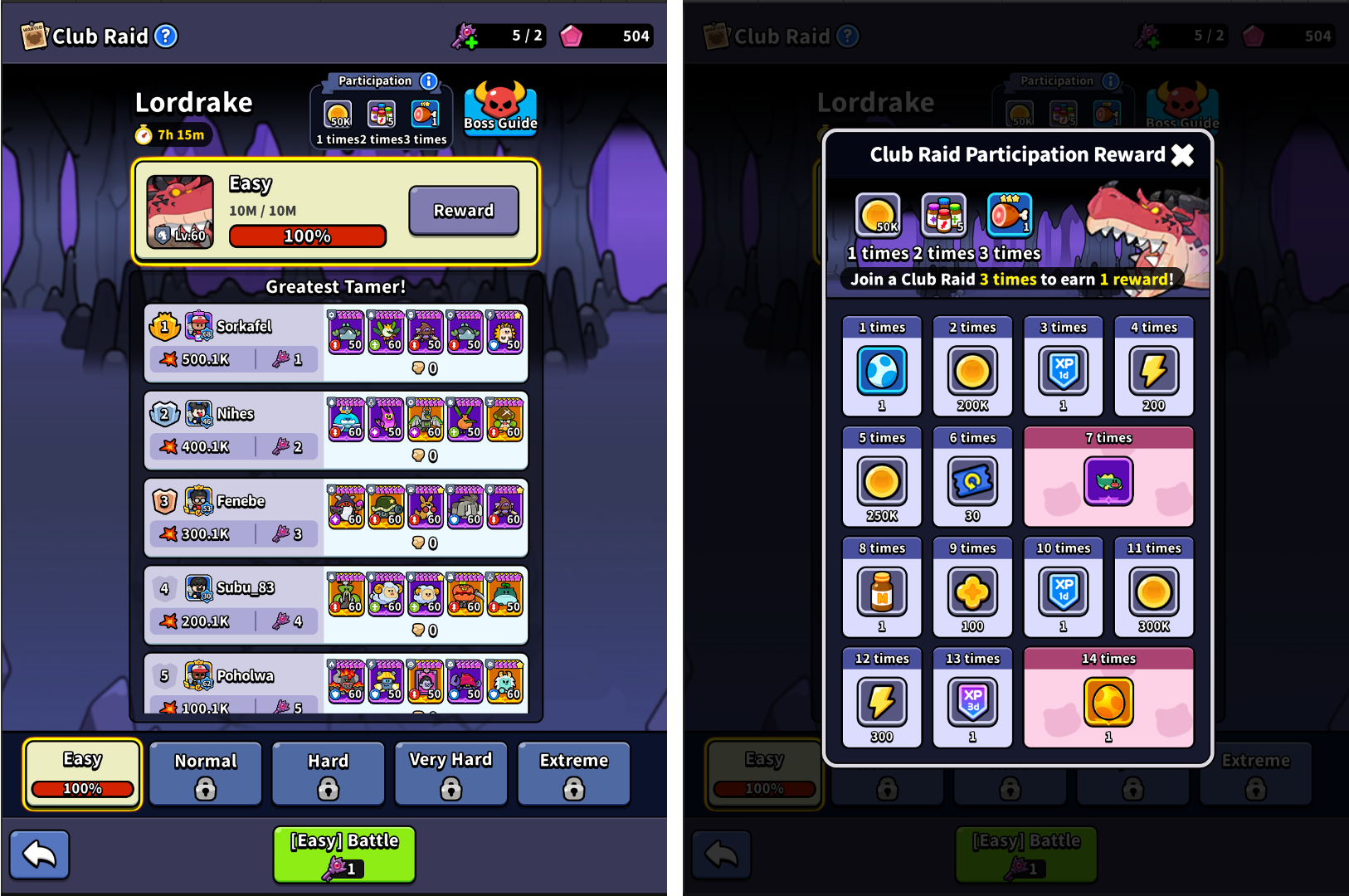
Daily challenge rewards and Quick Battle are added to Club Raid, and the screens get a fresh new look.
- Daily Participation Rewards: Earn a reward each time you take part in Club Raid 1 / 2 / 3 times in a day.
- Club Raid Participation Reward: Each day you claim all 3 daily rewards, one of the 14 reward slots opens.
- Quick Battle: Runs Club Raid as an auto-battle and shows the results quickly. It becomes available once you deal enough damage with a single Key to earn the final reward of that difficulty. Use the [i] button on the Team screen to check the required damage and your Best Record.
- Lobby Screen Overhaul: Check your Club members’ rankings for the selected difficulty right away.
- Results Screen Overhaul: Watch your total damage climb, and see the current chest, the next chest, and the remaining damage at a glance.
- In the Greatest Tamer list, you can view each Master’s Runestone Sets, MonMon details, and Replays.
- Battles that are in progress when a season ends now count correctly toward the next season’s record.
- The boss’s ATK on Easy difficulty (Stages 1–2) is lowered, so it’s easier for Masters taking it on for the first time.
New System: Club Member Gifts · Club Invitations
Club Member Gifts
- Purchase a package marked “Gift for Club too!” in the Shop, and a Gift Box will be posted in Club Chat.
- Club members can tap the Gift Box to randomly receive one of Gems, Energy, or Gold.
- Gift Boxes come in Common · Uncommon · Rare · Epic · Legendary rarities, and the reward range depends on the rarity.
- The Master who made the purchase can also claim their own gift.
- Gifts can be claimed for 24 hours after purchase, and you can claim other Club members’ gifts only after 24 hours have passed since joining the Club.
Club Invitations
- Club Leaders can send a Club Invitation to Global Chat with the [Promote] button in the Club Info tab. (Once per day)
- Invitations show the Club’s name and join requirements, and you can join directly from the chat. You can even join during battle.
- Invitations cannot be sent while the Club is full.
Other Club Changes
- The maximum Club size increases from 20 to 30 members.
- Your Club’s building in Town now displays a signboard with your Club’s name and emblem.
- Club Chat speech bubble designs are unified.
New System: Growth Helper
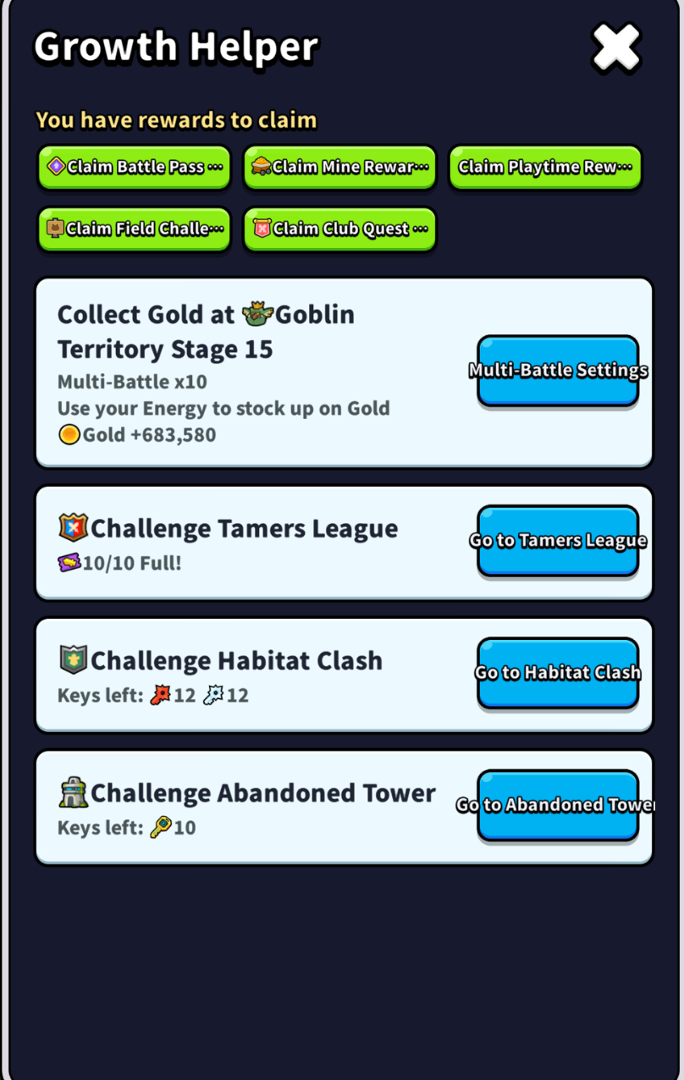
A Growth Helper is added that tells you what’s best to do right now when you’re stuck or defeated on the Field.
- Unlock Condition: Opens upon reaching Blueleaf Forest Road 5
- Open it from the Lobby button or from the guide card on the defeat results screen.
- It recommends the most effective things to do right now — rebuilding your Team and swapping positions, Runestone Auto-Equip, MonMon Level Up & Evolution, and more — and takes you straight to the right screen with a single button.
New System: Battle Replay
You can now rewatch other Masters’ battles and your own Tamers League battles. See firsthand how strong teams fought and use it as a reference for your own Team.
- Watch Replays from 4 battle modes. (Dungeon Suggested Teams, Tamers League records, Club Raid Greatest Tamer, and more)
- Share Replays to Club Chat from the Club Raid results screen, and Club members can watch them right in the chat.
- The playback screen has a progress bar and Battle Speed (x1 / x2 / x4), and the speed you set is kept for your next Replay.
- Replays recorded on a different game version can be watched after you check the notice message. Replays cannot be played during battle.
Runestone · Growth Improvements
 Auto-Sell: Runestones and Accessories obtained during Multi-Battle that don’t meet your keep conditions can be automatically sold for Gold.
- Auto-Equip Improvements: Recommendations now take into account the popular Sets and Main Stats most used by other Masters. You can also check how your stats change with Auto-Equip, and swap the recommended items to match the conditions you want.
- Runestone / Accessory Statistics: Use the [Statistics] button in the MonMon gear tab to check each MonMon’s popular Sets, Main & Sub Stat rankings, and how they compare with your own setup.
- Filter Improvements: Find the Runestones you want more easily with Include / Exclude Sets, Stat Priority sorting, and more.
- The Upgrade All screen now shows how many Runestones will be upgraded for each target level, along with their levels before and after upgrading.
- Tap a Runestone you received on the rewards screen to sell or upgrade it right away.
MonMon Review Overhaul
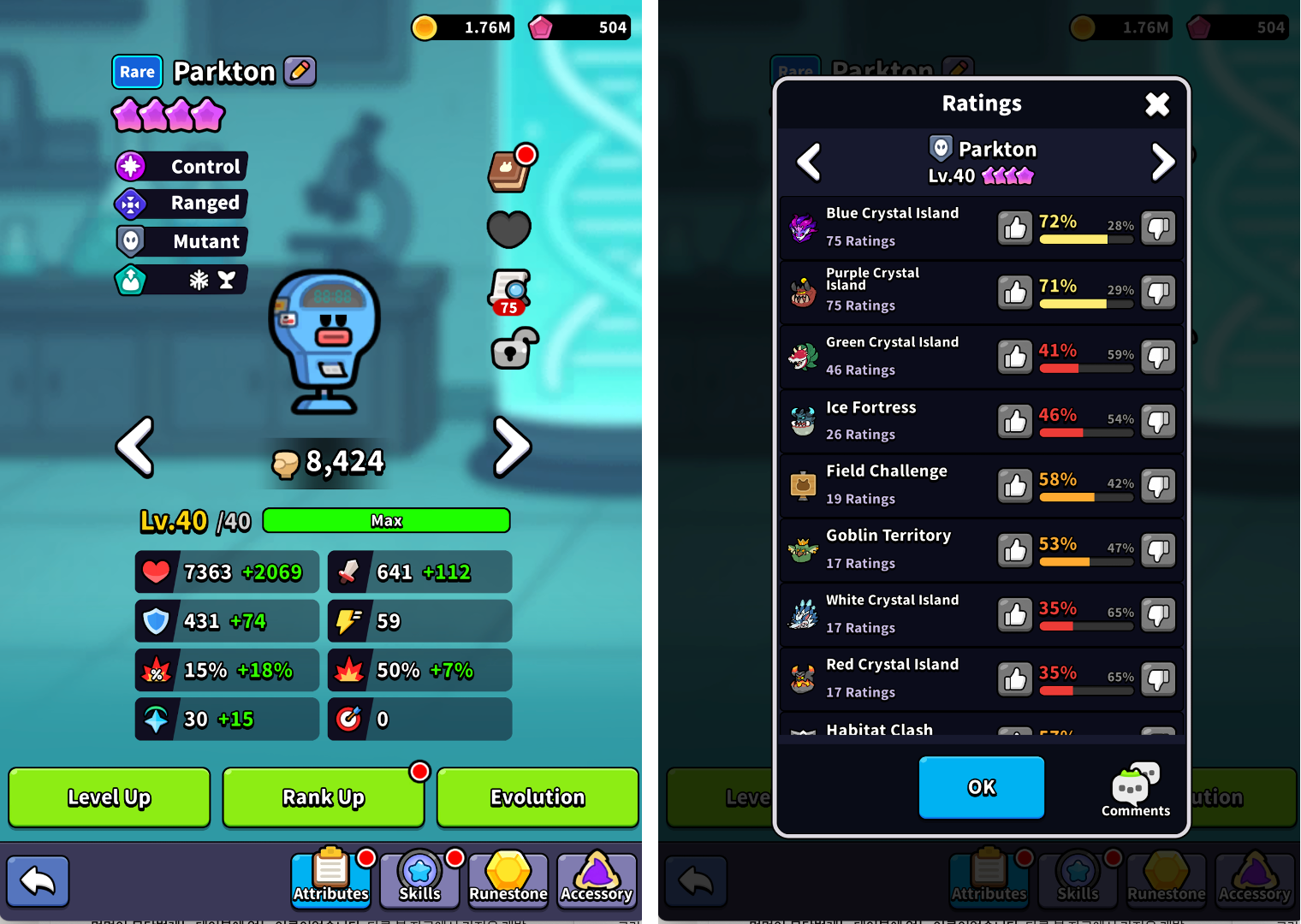
MonMon Reviews have been overhauled, so you can now see the ratings left by other Masters as well.
- Reviews now rate how well a MonMon performs in each piece of content, and the number of ratings from other Masters is displayed.
- Use the [Comments] button on the review screen to check existing community reviews right away.
- You must own the MonMon at Rank 5 or higher to rate it, and the same MonMon can be rated once per day.
- Once you raise a MonMon to Rank 5, a notification appears on the Review button.
- Review 10 MonMon to earn the Review Frame, and 100 MonMon to earn the Review Expert Frame.
Convenience Improvements
Battle · Results Screen
- The Multi-Battle Settings screen has been adjusted, and the maximum MonMon Queue for Multi-Battle increases from 20 to 60.
- Dungeon Suggested Teams are unified into a single screen and can be sorted by “Suggested” / “Best Time”.
- On the Team screen for Dungeons, Club Raid, and Abandoned Tower boss floors, you can check boss stats with the [i] button.
- When a skill is ready, the flame behind the card is now bigger, and its color differs by MonMon rarity.
Rankings · Tamers League
- A 1st · 2nd · 3rd place podium is added to the Rankings screen.
- The Tamers League battle-start VS presentation has been revamped, and both Masters’ info is shown at the top of the battle screen.
- Opening the Tamers League Tiers tab now shows your Tier in the center of the screen.
Items · Shop
- Tap an item icon to see detailed info including its description, amount owned, and rarity. Chest items also show a list of their contents. You can check this from Shop products and your Crystal Amount as well.
- You can now go straight to the Wardrobe from the Costume Shop.
Other
- PC and emulator keyboard controls are now supported. (WASD / arrow keys to move, Q–T to use skills, ` key for chat, Esc to go back, etc.)
- When the game language is set to Japanese, an official X (formerly Twitter) shortcut button is added to the Settings screen.
- To improve the early-game experience, a timing-based tap mechanic has been partially applied to skill activation, and the unlock timing for AUTO battle and Battle Speed has been adjusted.
- A number of other bug fixes and optimizations have also been applied.
Official Discord Announcement
The MonMon Masters development team avoids chasing short-term results or one-off operations. Above all else, we believe the most important thing is ensuring that our Masters' precious time and love are never wasted — by building a "sustainable game" and a "MonMon Masters that players can trust and enjoy for the long haul."
The Official Discord is more than just a channel for announcements — we plan to build it into a comfortable space where the development team directly listens to and responds to the voices of our Masters. Special events and rewards exclusively for our Discord Masters will also be prepared on a regular basis.
Every piece of honest feedback our Masters leave behind is a precious foundation that helps us build a better game. We sincerely ask that you join us on the long journey ahead for MonMon Masters.
Join the Official Discord: https://discord.com/invite/nZuzRGNyQa (Click)
We will always stay true to our original vision and continue to strive to bring our Masters a polished and enjoyable MonMon Masters experience.
Thank you. — MonMon Masters Development Team